Built for Europe · country profiles Austria and Germany today

Scheduling and time tracking with NFC technology

No terminal, no installation: put the NFC tag up at the staff entrance — done. Employees clock in with their own phone. The hours: export as Excel (XLSX) in your payroll office's template.

49 € / month and location · plus VAT · 58.80 € incl. 20 % VAT in Austria

One NFC tag per location included · 15 active employees included · cancel monthly
How it works

Three steps from the NFC tag to the hours list

  1. Step 1

    Put the NFC tag up at the staff entrance

    The NFC tag comes as a kit by post, already assigned to your location: an NFC tag (NXP NTAG 424 DNA, 28 × 28 mm, white, made for metal) and a location sign 100 × 100 mm (vinyl, laminated). Place the NFC tag under the marked circle on the back of the sign and stick both to the door or wall — the NFC tag is invisible underneath, the orange circle shows where the phone goes. Then switch «NFC» on for the location in the Back Office — no mounting, no power, no network. One kit per location is included in the price.

    NymTime NFC · TIME CLOCK Tap your phone here Get the app Scan to download nymtime.com
    Location sign 100 × 100 mm at the staff entrance, the NFC tag underneath

    Detail from the Back Office, Settings → NFC tags: the row of one NFC tag with its code, chip type NTAG 424 DNA and status «Active»
  2. Step 2

    Employees clock in with their phone

    Hold your own phone to the NFC tag. The chip produces a new signature on every touch, and one device belongs to exactly one person. Without NFC: «I am here» and «I am leaving» in the app — where the business has enabled location clock-in, accepted only inside the location zone. The QR code on the location sign only opens the app's download page.
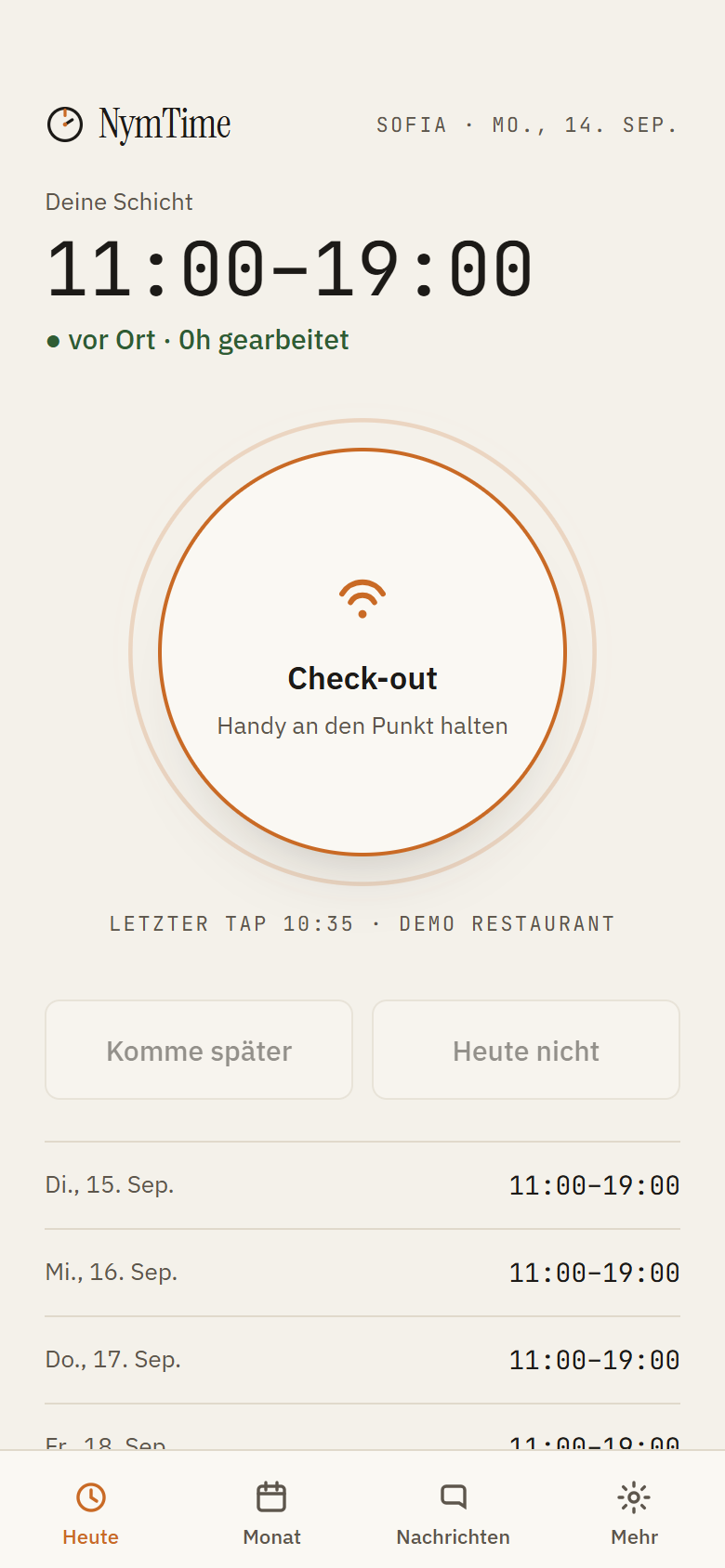
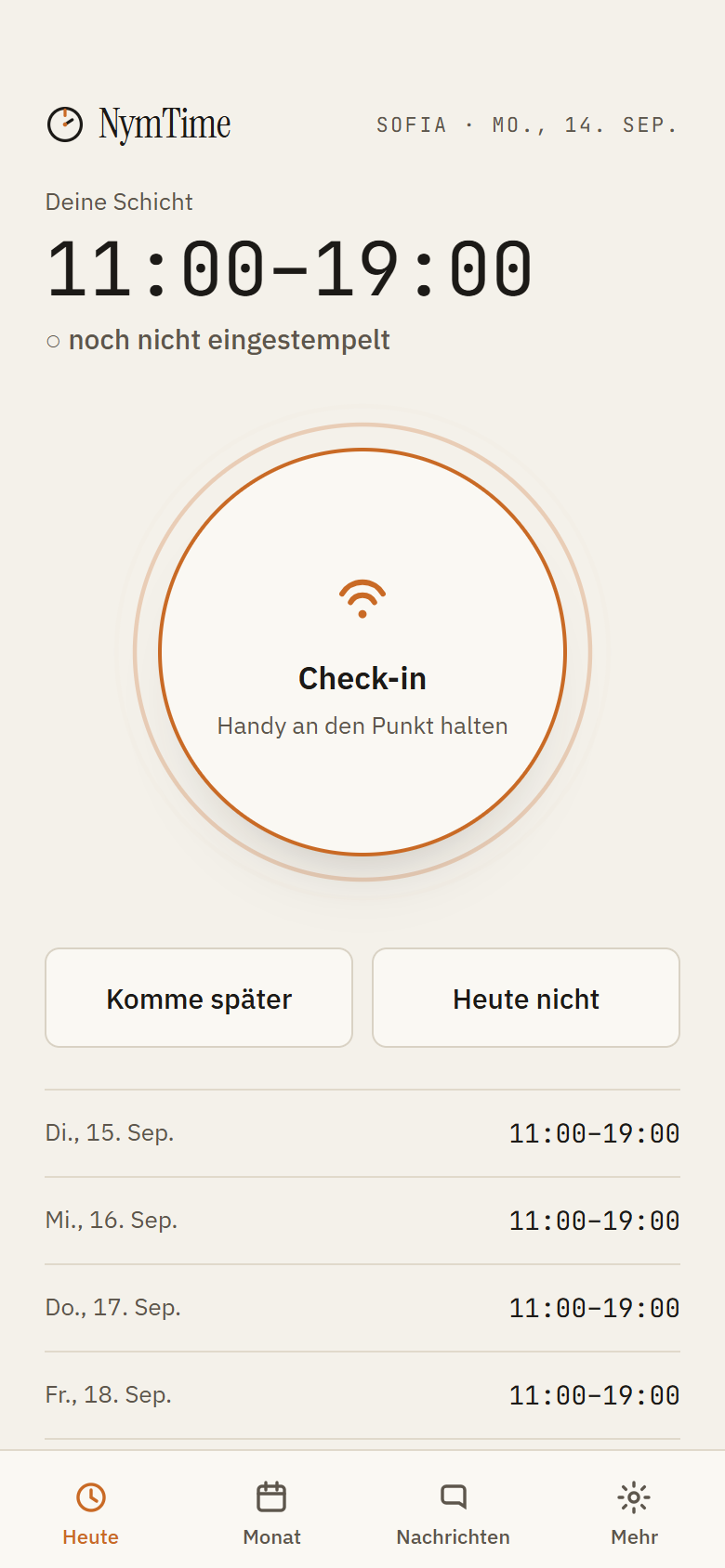
    Employee app: today with the shift, the clock-in ring and a recorded clock-in
  3. Step 3

    Hours as Excel for your payroll office

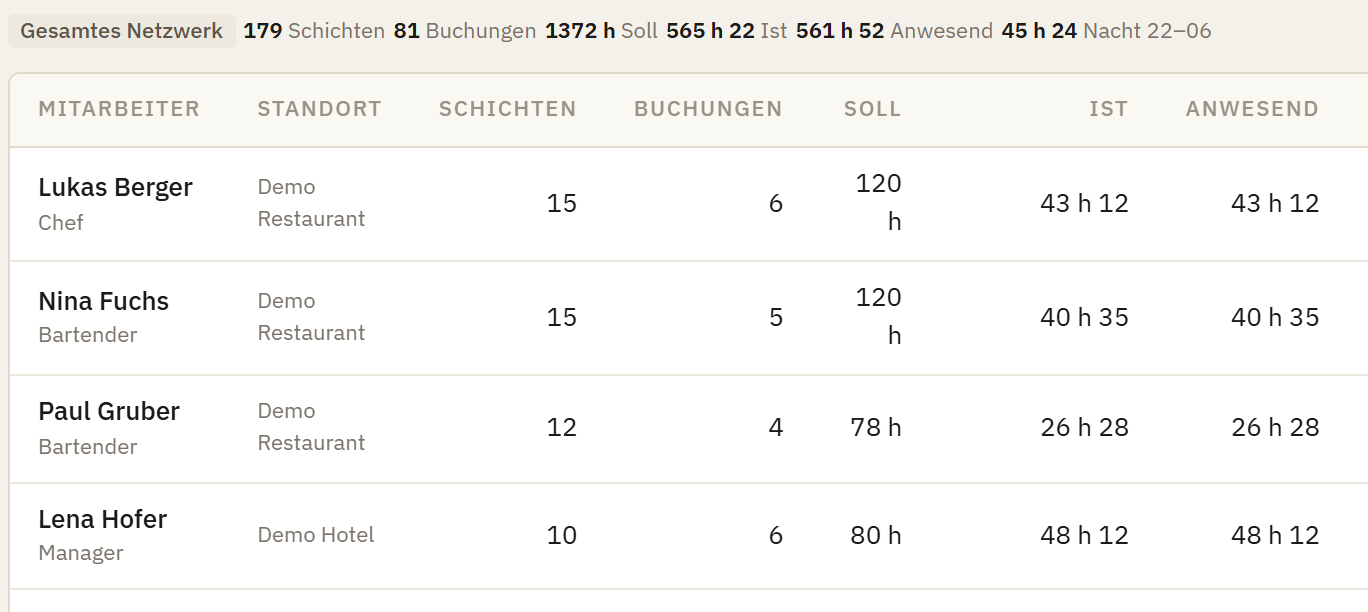
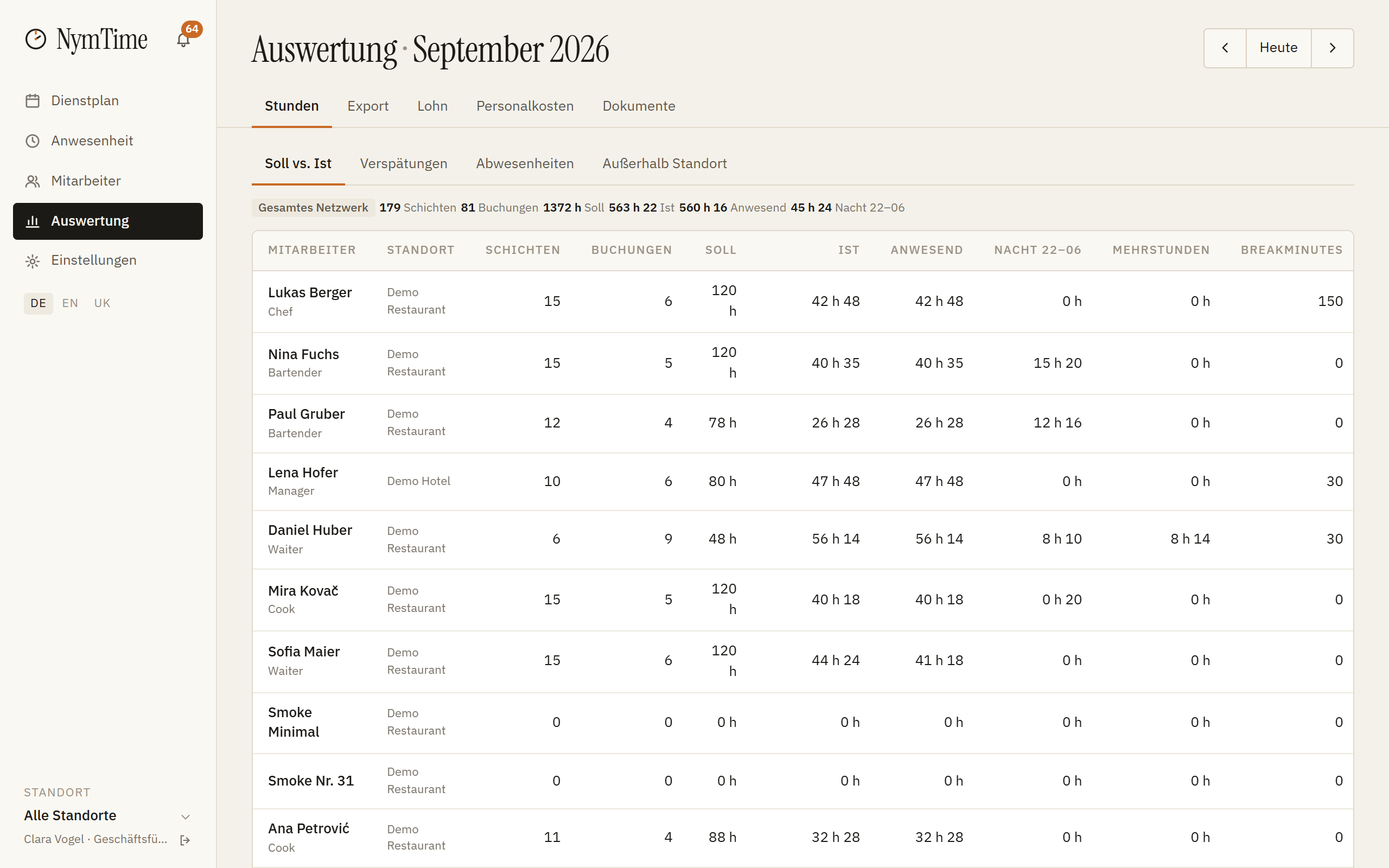
    Planned and worked sit in the same row, with lateness and absences alongside. At the end of the month the Excel file goes out in your accountant's own template; the records under § 26 AZG are produced along the way.

    Detail from the Back Office, Analytics → Hours: four employees with planned, actual, present and extra hours
    XLSX for payroll
Tour

Eight screens from the schedule to the export

Real captures from the Back Office and the employee app, with demo data from our test environment. It runs on its own — or you click through.
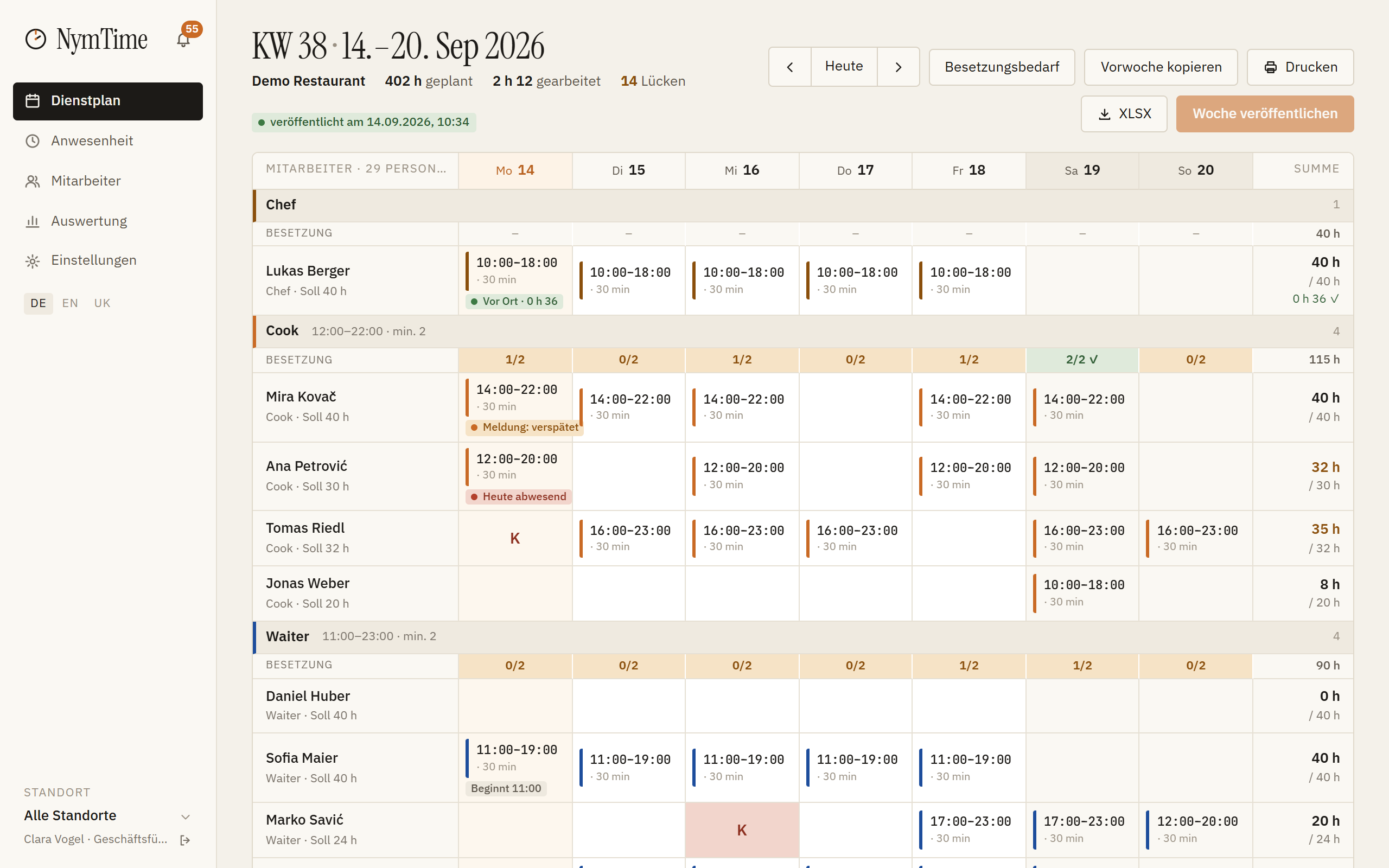
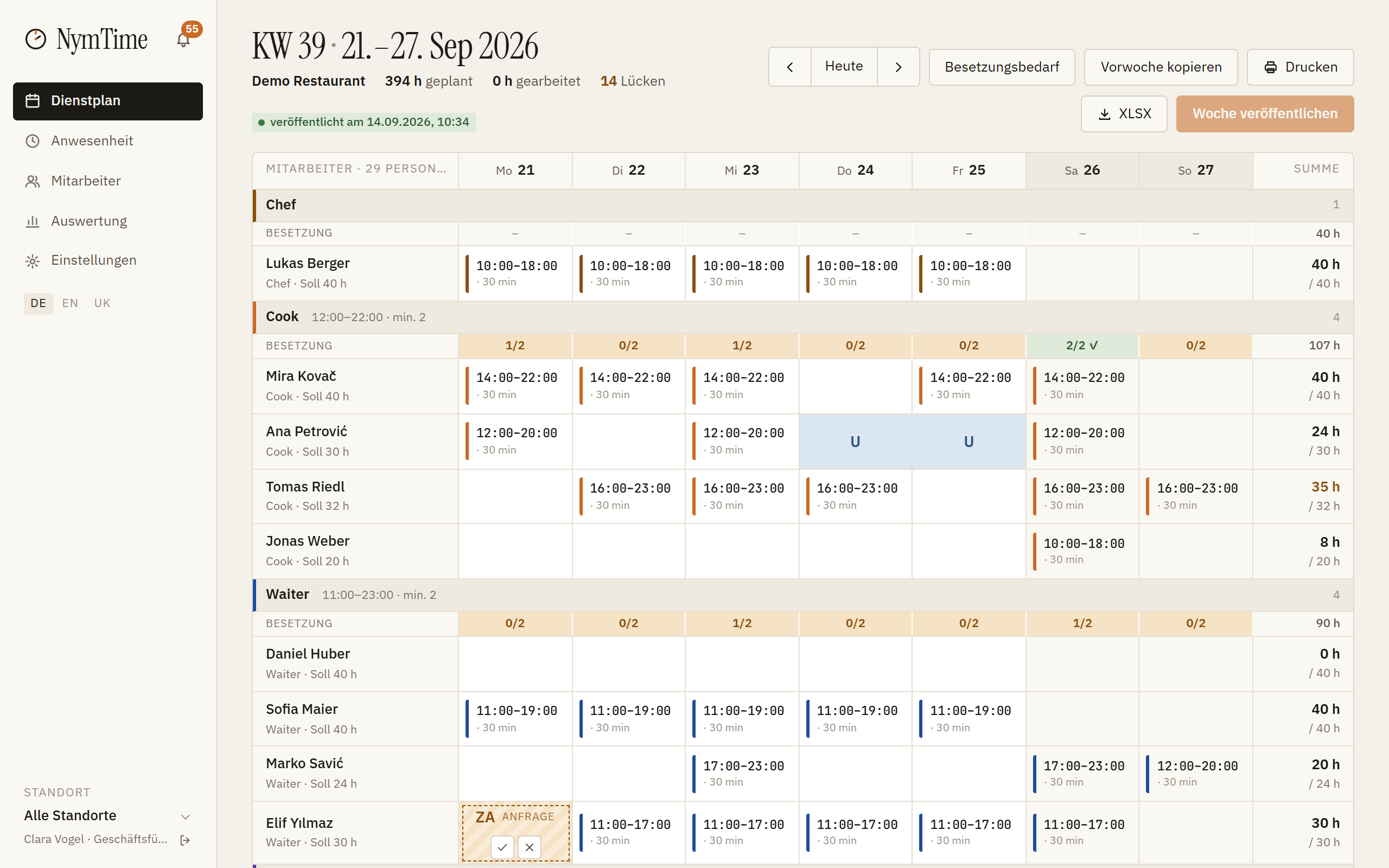
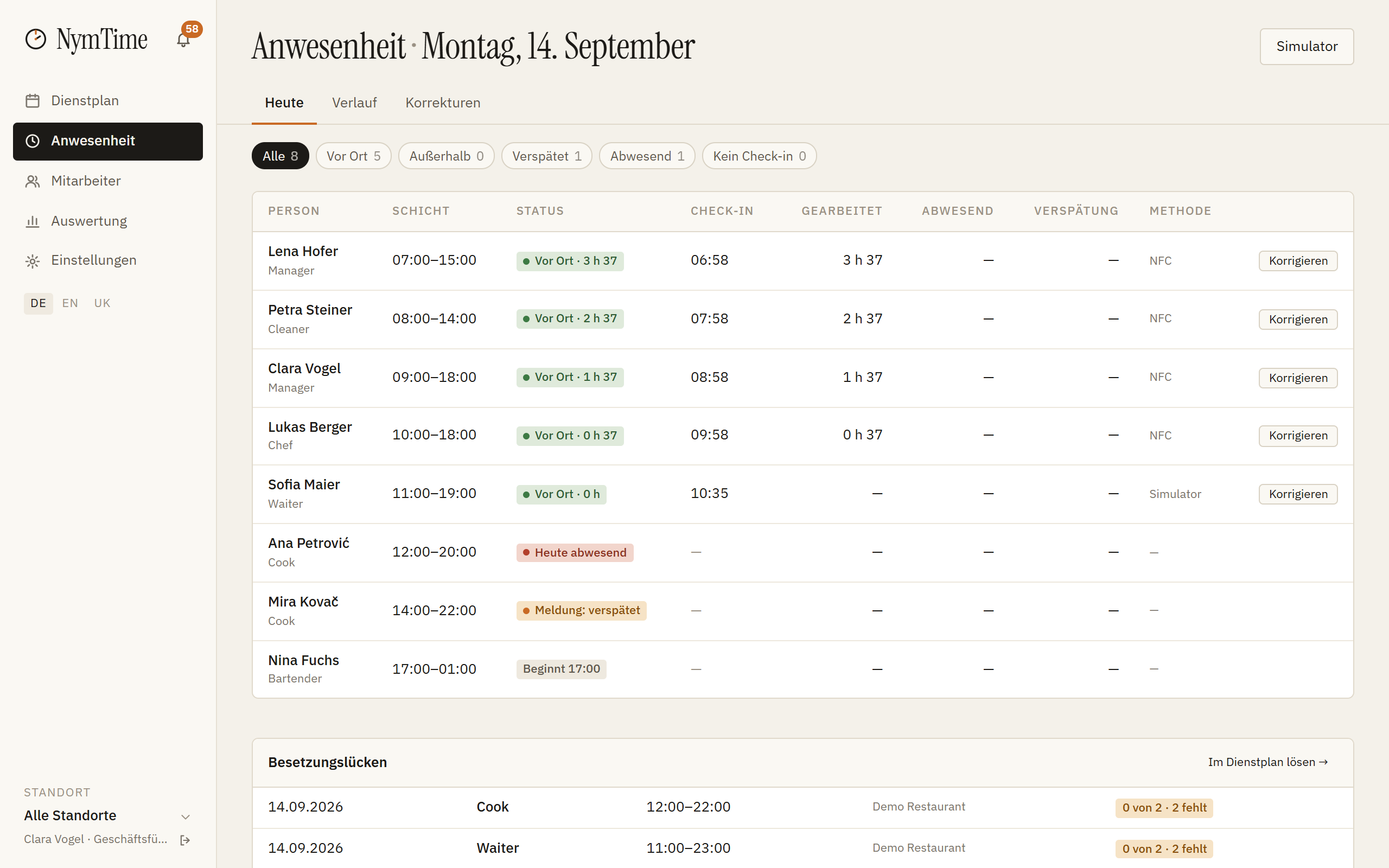
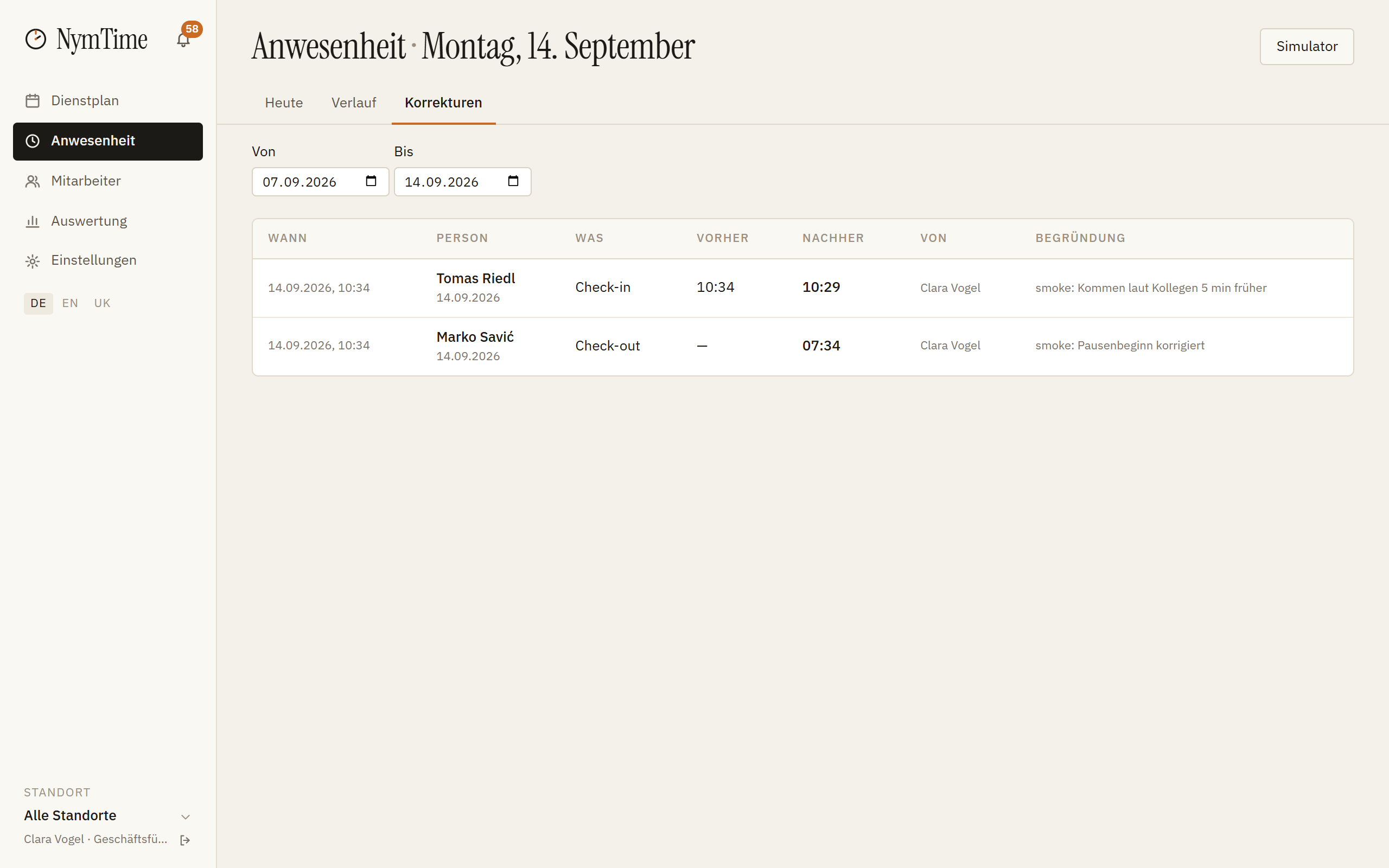
Back Office: weekly plan with role groups, shifts and staffing per dayBack Office: the coming week with drafts and the publish buttonEmployee app: today with the shift and the clock-in ringEmployee app: a recorded clock-in with the timeBack Office: today's attendance boardBack Office: list of corrections with reason and editorBack Office, analytics: planned against worked hours per employeeBack Office, analytics: export with the stored Excel template
Image 1 of 8The week's schedule

Rows are employees, columns are days. Above every role group stands the staffing for that day.

The same steps as written guides
One price

Calculate the price for your business

Calculate the price for your business

15 employees included · 15 per location

Billing

15 active employees per location included — status “active” in the Back Office, counted at the main location. When one more joins, NymTime asks: archive an employee who has left (they stay in every report) or confirm 2 € net per month for each further one. Archived employees stop counting from the next contract month (Terms § 7).

1 × Location · 49 € each49 €
15 employees included · 15 per location0 €
0 further seats · 2 € each
expected, billed by active employees
0 €
Total net · per month49 €
58.80 € incl. 20 % VAT
plus 20 % VAT9.80 €
gross in Austria58.80 €
Orders are possible in October 2026.Questions: support@nymtime.com
All prices are net, plus VAT. In Austria 20 % VAT comes on top; businesses in other EU states with a valid VAT ID are billed without VAT (reverse charge).
See pricing and calculator →
Questions

Common questions about product, price and data

Do my employees need a particular phone?
An iPhone from the iPhone 7 or an Android device with NFC clocks in at the NFC tag. Without NFC — if the business has enabled location clock-in — you tap «I am here» or «I am leaving» in the app; the server accepts that time entry only inside the location zone. The QR code on the location sign only opens the app's download page; it cannot be used to clock in.
What happens if the internet goes down?
The time entry is queued on the phone with signature and device time and synchronised as soon as the connection is back. Nobody stands at the door unable to clock in.
Can someone clock in for a colleague?
NymTime is designed to prevent that: a trusted device (one phone per person), a genuine NFC tag (signed code) and the location check (inside/outside, no coordinates). Anyone who hands over their unlocked phone bypasses this deliberately. Every time entry is logged with device, method and time; only the people allowed to view attendance see these details, so that discrepancies can be clarified.
How do the hours reach my accountant?
You store her Excel template once; NymTime fills it every month with planned and worked hours, absences and late arrivals. Export as XLSX or CSV.
How do I get the NFC tag?
One kit per location is included — NFC tag (28 × 28 mm) and location sign (100 × 100 mm) — and arrives by post: 2–4 working days in Austria; in other EU countries subject to availability. Each additional kit costs 24 € plus VAT — in the purchase form or later from the Back Office. Until it arrives, the team uses location clock-in in the app («I am here» inside the location zone) where your country's legal steps allow it — the Back Office shows them; otherwise NFC from the kit's arrival.
Who counts as an active employee?
Everyone whose status in the Back Office is «active», counted at their main location. 15 active employees per location are included; from the 16th you confirm an extra seat in the Back Office at 2 € plus VAT per contract month, pro rata from the day you confirm it. Archived employees do not count (Terms § 7).
How do I pay, and do I get an invoice?
By credit card or SEPA direct debit through Stripe. The first contract month is charged at purchase, every further one on its first day. All prices are net; what comes on top depends on where you are established: 20 % VAT in Austria, no VAT for a business in another EU member state with a valid VAT ID (reverse charge). The invoice arrives by e-mail and sits in the Back Office under Settings → Subscription.
How do I cancel?
At any time in the Back Office under Settings → Subscription or by e-mail, effective at the end of the running contract month. There is no minimum term and no notice period; single locations can be cancelled individually (Terms § 5).
Where is the data stored?
Employee and business data sit on servers in the EU (Hetzner, Falkenstein). Cloudflare serves the website and forwards the traffic to the service, Resend sends the e-mails, payments run through Stripe; these transfers to the USA rely on the EU-US Data Privacy Framework and standard contractual clauses. NymTime is the processor, your business is the controller; the data processing agreement under Art. 28 GDPR is part of the purchase. We store no coordinates and no routes — only «inside the zone / outside» during the shift.
What if an NFC tag stops working?
If an NFC tag fails within 12 months of delivery without external damage, we replace it free of charge — an e-mail describing the fault is enough. Lost, removed or damaged NFC tags are re-ordered in the Back Office at 24 € plus VAT; the old one is blocked there and is invalid from that moment.
Do I need a terminal on the wall?
No. People clock in at the NFC tag with their own phone. There are no devices to rent, mount or maintain, no power socket and no network port.
Can I use NymTime in Germany?
Yes. NymTime is built for Europe — with country profiles: Austria (AZG) and Germany (ArbZG) today, more country profiles to follow. The EU only sets minimum standards with Directive 2003/88/EC, each country implements them on its own; the EU baseline profile reflects those minimum standards and does not replace a country profile. In the German profile NymTime works with a 30-minute break from 6 hours and 45 minutes from 9 hours, 11 hours of rest, at most 48 hours a week across the reference period, and vacation under the BUrlG. Works-council codetermination under § 87 BetrVG remains your business's own matter — NymTime supplies the figures for it.
How do I sign in?
With your e-mail address and a password you set yourself, through the link in the e-mail you receive after the purchase. Forgotten it? «Forgot password» sends a link to the same address. If you want it stricter, switch on two-factor sign-in for the whole business with a time code from an authenticator app (TOTP).
How is VAT calculated?
The prices on this site are net, that is without VAT. For customers in Austria 20 % VAT comes on top: 49 € becomes 58.80 €. Businesses in another EU member state with a valid VAT ID receive the invoice without VAT — the tax liability passes to them (reverse charge, Art. 196 of the VAT Directive); we check the number against the EU system VIES. Businesses without a VAT ID are charged 20 % Austrian VAT.